Yes, a business team can set up no-code AI agents. Pick one repetitive, low-risk job. Write the goal and what done looks like. Connect only the tools that job needs. Run it while someone watches, then save and schedule it. Add a second agent once the first runs well. Connecting internal systems is where a technical person helps.

Can you build AI agents with no code?
Yes, for a first agent, though some vendors call their tools low-code rather than no-code. As of November 2026, Microsoft describes Copilot Studio as “a graphical, low-code studio for building and managing AI-powered agents and workflows”. It says you can build capable solutions “without an extensive technical background”.
Zapier also sells an agent builder. As of November 2026, Zapier says you create agents with the help of Zapier Copilot, and that they work across the apps Zapier connects.
In our view, “no-code” means you set up an agent by describing its goal and choosing its tools in a screen, not by writing scripts. The agent still needs a clear job, careful access and a person watching the early runs. Those parts are not code, and they decide whether the agent is useful.
How do I start using AI agents in my company without engineers?
Start small and widen only when the first agent has earned it. The Australian Signals Directorate’s Australian Cyber Security Centre (ACSC) published guidance on agentic AI on 1 May 2026, with other agencies. It is written for larger organisations, including government and critical infrastructure. Steps 1, 3, 4 and 6 below apply its advice to a small team, which is our reading. Steps 2 and 5 are our own.
- Pick one job. ACSC says to “limit initial use to low-risk, well-defined tasks”. Choose something repetitive that a person already does in the same way. ACSC also suggests considering “reducing or eliminating low-value processes”. If the job is low-value, check whether it could simply be cut, which ACSC notes may be lower risk.
- Write the goal and what done looks like. Say what the agent should produce, for whom and by when. Our guide to writing agent instructions covers the wording.
- Limit access. Connect only the tools the job needs. Where a tool lets you narrow it, give the agent only the folders, files or inbox the job uses. ACSC says to avoid ever granting an agent “broad or unrestricted access, especially to sensitive data or critical systems”. It lists “an email assistant with write access to any inbox” as an example of overly broad permissions.
- Watch the first runs. ACSC recommends “graduated autonomy” that raises independence “whilst maintaining human oversight and understanding”. Set up your own process so a person reads each draft first.
- Save it and schedule it. Once the output is steady, keep the setup as a reusable agent and run it on a schedule. Set it up so a person still reads each draft before it goes anywhere. A template is a quick way to get the first version.
- Add a second agent. Do this only after the first runs well and its drafts need few changes. Give the second agent its own job and its own limited access.
Which job should your first agent do?
Choose a job where the output is a draft that a person reads first. The table below is our view, using ACSC’s examples where they apply.
| Job | Good first job? | Why |
|---|---|---|
| Weekly status report from meeting notes and documents | Yes | A person reads the report before anyone else sees it. |
| Sorting a shared inbox and drafting replies | Not at first | Outside emails can carry hidden instructions that the agent reads before anyone sees them. |
| Turning a brief into a LinkedIn post draft | Yes, as a draft | A person reviews and posts it. |
| Sending payment reminders to customers on its own | Not at first | It writes to customers and touches money. |
| Approving supplier invoices or payments | No | It needs the right to approve payments, and ACSC’s procurement example shows how that can be misused. |
The inbox row carries a real risk. ACSC notes that attackers “could perform prompt injection attacks” by putting malicious prompts in phishing emails. That is why the inbox is not a first job. Start with the status report. Add the inbox later, set up so the agent only drafts replies and a person sends them. Where the tool allows it, connect only that one inbox.
The last row follows ACSC’s procurement example. It describes an agent given “broad access to financial systems, email and contract repositories” that is misused to “modify contracts and approve payments”. A first agent should never hold that much access.
Which AI agent platforms let a non-technical team set up several agents without code?
Several vendors sell builders for this, though not all call themselves no-code, and they differ in how you set an agent up. As of November 2026, Microsoft calls Copilot Studio a “graphical, low-code studio”. Zapier describes agents you create with the help of Zapier Copilot.
Our comparison of no-code agent builders lays the options side by side. Check each vendor’s own pages for current features before you choose.
When does a no-code team need a developer?
In our view, mostly when an agent has to reach a system with no ready-made connection. Examples are a custom database, an in-house tool or an older internal system. Someone technical should also decide what that connection lets the agent see and change, since the agent can reach whatever it allows.
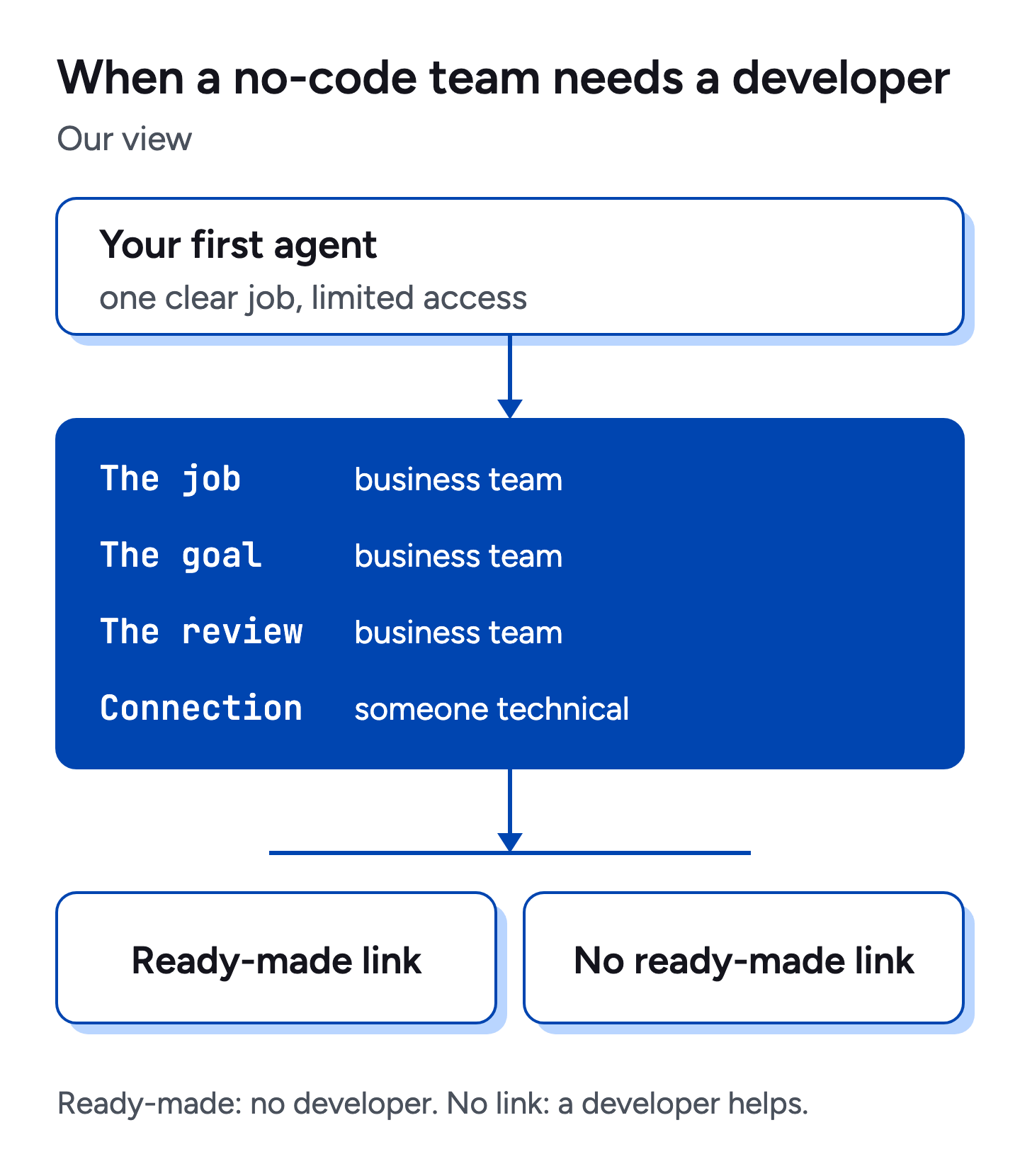
A developer helps with the connection, and the business team still owns the job, the goal and the review. Our guide to connecting your systems through MCP explains how that link works. By the same reasoning, a first agent that uses tools with a ready-made connection does not need a developer.
How TobyBot fits
TobyBot is an agentic bot by Xinference. You set a goal. TobyBot plans the steps, shown as one card for each, then runs them with your tools. Every tool call and result is visible while it runs, and you can pause it.
A task can be saved as a bot that keeps its role, model, tools and knowledge, and can be run again or scheduled. Templates include support chatbot, inbound leads, LinkedIn post, email, content, inbox manager, slides and documents. Five specialist bots ship in every workspace: support, growth, planner, knowledge and studio.
Native connectors cover Google (Gmail, Calendar, Drive, Maps), Microsoft (Outlook, Teams, OneDrive), Meta (Facebook, Instagram) and LinkedIn. Other systems, including internal ones, connect through MCP servers. If you want a no-code AI agent builder built around goals, see TobyBot or talk to us.
Questions
Is it possible to build AI agents without coding?
Yes, for many first jobs. Microsoft says Copilot Studio is low-code and that you can build “without an extensive technical background”. Zapier says you create agents with the help of Zapier Copilot. You still need to define the job and limit its access.
What is a no-code agent?
A no-code agent is an AI agent you set up through a visual or plain-language screen instead of writing code. You give it a goal, connect tools and decide when it runs.
Do I need a developer to start using AI agents?
Not for a first agent that uses tools with a ready-made connection in the platform you choose. You may need a developer later to connect internal systems that have no ready-made connection.
Can a non-technical team run several agents?
Yes, if each agent has one clear job and limited access. Add them one at a time, and start the next only after the previous one runs well.
Are no-code agents worse than coded ones?
In our view, they suit most first jobs well. A coded agent gives more control over unusual systems, while a no-code agent gets a team started sooner.
Try TobyBot. See what teams set it to do, or book a demo and bring a goal.


